Play365 Payment Methods in Australia: AUD, PayID, Osko and Cards
 Available in US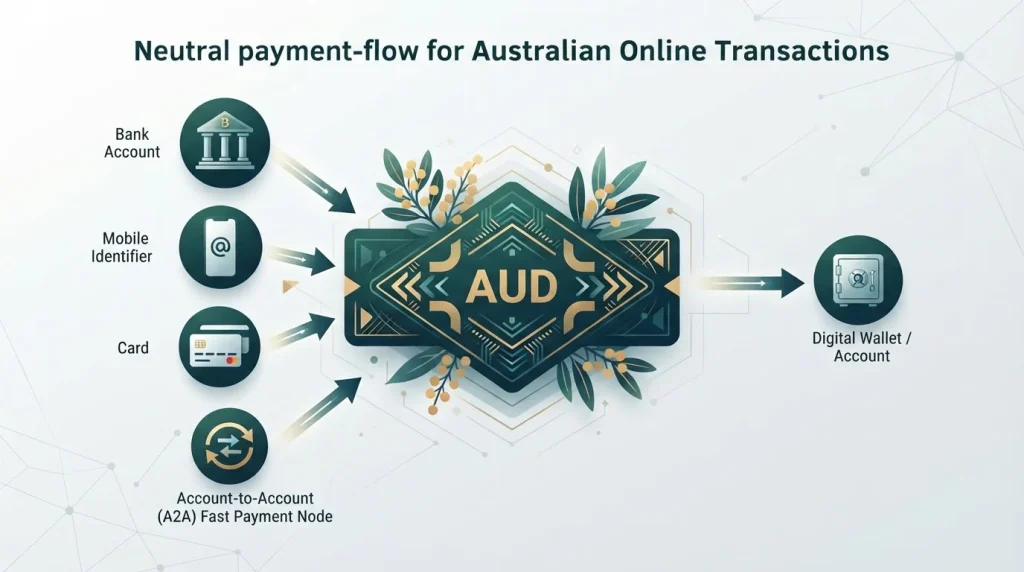
Play365 is currently listed with AUD support and six payment methods relevant to Australian users: Visa, Mastercard, bank transfer, Apple Pay, PayID and Osko. The important limitation is direction. The current information does not prove that every listed method works for both deposits and withdrawals, and the source itself notes that availability can change by country. Treat the list as evidence of cashier support categories, not as a guarantee that every option will appear for every Australian account.
For Australians, PayID and Osko deserve special attention because they are established parts of Australia’s account-to-account payment infrastructure. Their presence in a Play365 payment listing is locally meaningful, but it still does not establish the exact deposit limit, withdrawal support, fee or processing time. Those details should be checked in the live cashier. Those distinctions are important when checking the cashier.
Table of Contents
- Play365 payment methods currently listed
- PayID and Osko: what the Australian labels actually mean
- Deposit support and withdrawal support are different questions
- How to verify a Play365 cashier method
- Cards: Play365 listing versus Australian wagering rules
- Bank transfer, PayID and Osko: what to compare
- Details not confirmed
- Trust and payment details should be assessed separately
- What to check before depositing with Play365
- Play365 Payment Methods in Australia: AUD, PayID, Osko and Cards
Play365 payment methods currently listed
Current information lists Mastercard, Visa, bank transfer, Apple Pay, PayID and Osko, with AUD among the supported fiat currencies. This supports an Australia-relevant payment set without implying unconfirmed local limits.
| Method or feature | Current status | Likely use case | What to verify in the cashier |
|---|---|---|---|
| AUD | Listed as supported fiat currency | Account and transaction denomination | Whether your account is actually denominated in AUD and whether conversion applies |
| Visa | Listed payment method | Card funding where available | Deposit availability, card type accepted, fees and any issuer restrictions |
| Mastercard | Listed payment method | Card funding where available | Deposit availability, card type accepted, fees and any issuer restrictions |
| Bank transfer | Listed payment method | Account-to-account transfer | Deposit or withdrawal direction, bank details, limits and processing time |
| Apple Pay | Listed payment method | Wallet-style card funding | Whether it appears for your device and account, plus funding source rules |
| PayID | Listed payment method | Australian account-to-account transfer using a PayID identifier | Deposit or withdrawal direction, reference details, limits and account-name matching |
| Osko | Listed payment method | Fast Australian bank transfer service | Whether the cashier exposes Osko specifically and in which transaction direction |
Exact limits, fees and processing times are omitted because they can change and are not currently confirmed from a Play365 cashier or official payment page.
PayID and Osko: what the Australian labels actually mean
Australian Payments Plus describes Osko as a 24/7 bank transfer service and PayID as a simple, secure payment service within Australia’s fast-payments ecosystem. In ordinary banking use, PayID lets a person or business associate an easy-to-use identifier, such as a mobile number or email address, with an eligible bank account. Osko is a service used for fast bank transfers across participating institutions.
For a casino payment page, those definitions matter because the labels are sometimes treated as interchangeable marketing terms. They are related to Australia’s fast account-to-account payment infrastructure, but they are not proof of the same cashier process. A Play365 cashier could present PayID as the identifier used to send funds, Osko as the underlying fast-transfer service, or separate options depending on its payment provider. The current source only establishes that both names are listed.
That is why the most useful check is operational: open the cashier, select AUD if available, and see which rail is offered for the transaction you actually intend to make. Do not infer withdrawal support from a deposit button, and do not infer deposit support from a withdrawal-method table.
Deposit support and withdrawal support are different questions
Many casino payment lists flatten every method into one row, which can make the cashier look more flexible than it is. The current Play365 source explicitly notes that some methods may not be used for both deposits and withdrawals. This distinction is especially important for cards and wallet-style methods, which can be accepted for funding while withdrawals are routed to bank transfer or another supported channel.
For each method, ask two separate questions:
- Can I use this method to add funds to the account?
- Can Play365 return withdrawn funds through the same method?
If the answer differs, the withdrawal route can affect verification requirements and timing. The Play365 withdrawals guide covers that side of the process, including confirmed details and open questions. Keeping withdrawal analysis separate prevents a general payment table from implying capabilities that have not been established.
How to verify a Play365 cashier method
- Check the account currency. Confirm that AUD is selected or displayed before entering an amount. A supported currency in a review database does not guarantee every account defaults to AUD.
- Choose the transaction direction. Look separately at deposit and withdrawal screens. Record which methods appear in each.
- Read the minimum and maximum shown beside the method. Limits can vary by method, account and payment provider. Use only the current number shown for the account and method.
- Check any fee before confirming. A cashier can show a casino-side fee, while a bank or card issuer can apply its own charge or currency-conversion cost.
- Check the beneficiary or payment identifier carefully. For bank transfer or PayID, use only the details shown in the authenticated cashier for the current transaction.
- Check account-name requirements. Gambling and financial services commonly require payments to come from an account associated with the player’s identity. Do not assume third-party funding is permitted.
- Save the transaction reference. A bank receipt, transfer reference or cashier transaction ID is useful if support needs to trace a payment.
If account verification is requested, the account verification guide explains the evidence boundary: verification can be required, but exact document lists should not be invented when they are not sourced.
Cards: Play365 listing versus Australian wagering rules
Visa and Mastercard are listed in the current Play365 payment-method evidence. That product fact should not be confused with Australia’s separate federal credit restrictions for licensed online wagering services. ACMA states that, from 11 June 2024, online and telephone wagering operators cannot accept credit cards, credit-linked funds or digital currency for betting. The ACMA page describes wagering services and should not be stretched into a blanket statement that proves how an offshore online-casino cashier must behave.
This distinction is important because “Visa” or “Mastercard” does not by itself tell you whether a transaction uses debit or credit. A scheme-branded debit card can run on the same card network as a credit card. The current Play365 source does not specify card subtype, issuer acceptance or Australian account eligibility. The practical check is what the live cashier accepts for your account and what your bank allows.
The same scope discipline applies to digital wallets. Apple Pay is listed as a Play365 method, but Apple Pay can be linked to different underlying cards. A wallet label alone does not establish whether a particular funding source is permitted or processed.
Bank transfer, PayID and Osko: what to compare
For Australian users, bank-based methods can be easier to understand than card processing because the funds move from a bank account rather than through a card network. Even so, three operational details matter.
- Speed
- Osko is designed for 24/7 bank transfers, but that does not mean a casino balance must be credited instantly. Play365 or its payment processor may still apply internal checks before a deposit appears.
- Identification
- PayID can make the destination easier to identify than a BSB and account number, but the exact PayID shown for a transaction should be taken from the authenticated cashier. Never reuse bank details copied from a third-party review.
- Withdrawal direction
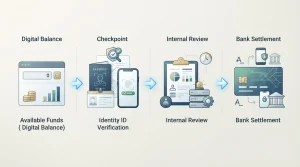
- A fast deposit rail does not establish a fast withdrawal rail. Cashouts can involve account review, identity verification and a separate processing queue before the bank transfer is released.
This is the core information-gain point for Australian readers: local familiarity with PayID or Osko should not be mistaken for evidence about Play365’s internal processing. The payment rail and the casino’s cashier process are separate layers.
Details not confirmed
The available evidence does not safely support exact Play365 deposit fees, card fees, transfer fees, minimum deposits, maximum deposits, withdrawal limits or method-specific processing times. It also does not prove that each listed method is available to every Australian account. Those gaps are intentional rather than omissions caused by lack of detail.
Payment information changes quickly. Processors can be added or removed, banks can decline categories of transactions, and a cashier can vary by account country. A static review should therefore distinguish stable context from live operational data. Stable context includes the fact that PayID and Osko are established Australian payment services. Live data includes whether a Play365 account sees PayID today and the minimum amount shown beside it.
The same logic applies to bonus funding. A method can appear in the normal cashier but be excluded from a particular promotion. See the bonus payment conditions guide for the separate verification steps around promotion eligibility.
Trust and payment details should be assessed separately
A long payment list is not a substitute for a licensing or trust assessment. Payment support shows that a casino or its processor can offer certain transaction channels. It does not establish local licensing, consumer-protection coverage or dispute-resolution rights. The trust and licensing page covers those questions separately.
That separation also prevents the reverse error. A licensing concern should not obscure unrelated payment facts when the payment listing itself is clear. The current source lists the methods above, so they can be assessed separately. What remains unverified – direction, limits, fees and processing times – is kept out rather than blurred with generic caution.
What to check before depositing with Play365
Play365 is currently associated with AUD plus Visa, Mastercard, bank transfer, Apple Pay, PayID and Osko. PayID and Osko make the list particularly Australia-relevant because both are established in the domestic fast-payments environment. The source also warns that method availability varies by country and that not every listed method necessarily supports both deposits and withdrawals.
The best way to use this information is as a cashier checklist, not a promise. Confirm AUD, confirm the specific method, confirm whether it is available for the direction you need, and read the live limits and fees before transacting. For cashout-specific evidence, continue to the cashout methods guide. For the broader brand assessment, return to the Play365 Australia review.